Using Topic Descriptions for Better Intent Matching
Topic Descriptions help Quack classify and route user questions more accurately. Each topic can include a short, structured description that guides Quack on what belongs in that category.
Well-written descriptions improve routing accuracy, reduce overlap between topics, and keep your topic structure clean as you scale.
Topic Descriptions are optional, but recommended for improving classification accuracy.
What Is a Topic Description?
A Topic Description is a concise internal definition of what a topic includes. It is used by Quack’s classification model and is not visible to end users.
Topic Descriptions help Quack:
Automatically route conversations to the correct flow and information
Reduce misclassification between similar topics
Maintain consistent performance
Think of a Topic Description as defining the scope and boundaries of a category.
How to Write an Effective Topic Description
Each Topic Description should be:
Clear and Scope-Driven: Define what belongs in the topic. Avoid marketing language or detailed policy explanations.
Concise: Use 1 to 3 sentences. Focus on strong intent and keyword signals.
Structured and Consistent: Follow the same format across all topics. Consistency improves classification performance across your Workspace.
Intent-Focused: Describe what the user is trying to accomplish, not how your company explains the product internally.
Recommended Format
Use structured phrasing such as:
“Includes requests about [primary intent], such as [representative examples].” or
“Issues related to [area], including [common examples].”
Avoid rigid phrasing like “only includes” or “exclusively covers” unless you intentionally need to restrict overlap.
When to Use Strict Language
Use stricter language when two topics are closely related and require clear separation. For narrowly scoped categories, phrases like “Includes only…” can help prevent overlap and improve precision.
Over-restricting descriptions can reduce classification flexibility.
Example
Topic: Device Warranty Claims
Description: Includes requests about submitting or checking the status of warranty claims for defective hardware, such as malfunctioning components or manufacturing faults.
This description clearly defines the scope, includes representative examples and does not share guidelines or policies.
What to Avoid
To maintain a clean and effective topic structure:
Avoid marketing or benefit-driven language
Avoid detailed eligibility rules, guidelines, or policy breakdowns
Do not include step-by-step instructions
Avoid referencing internal systems or team names
Do not make example lists feel exhaustive
Topic Descriptions define category boundaries. They should not replicate Help Center articles.
Maintain Consistent Granularity
All topics should be written at a similar level of detail.
For example, if one topic is broadly defined, such as “Billing Issues,” another topic should not include highly specific operational rules or edge-case breakdowns.
Keeping topics at the same level of abstraction reduces overlap and improves model accuracy.
How to Add or Update a Topic Description
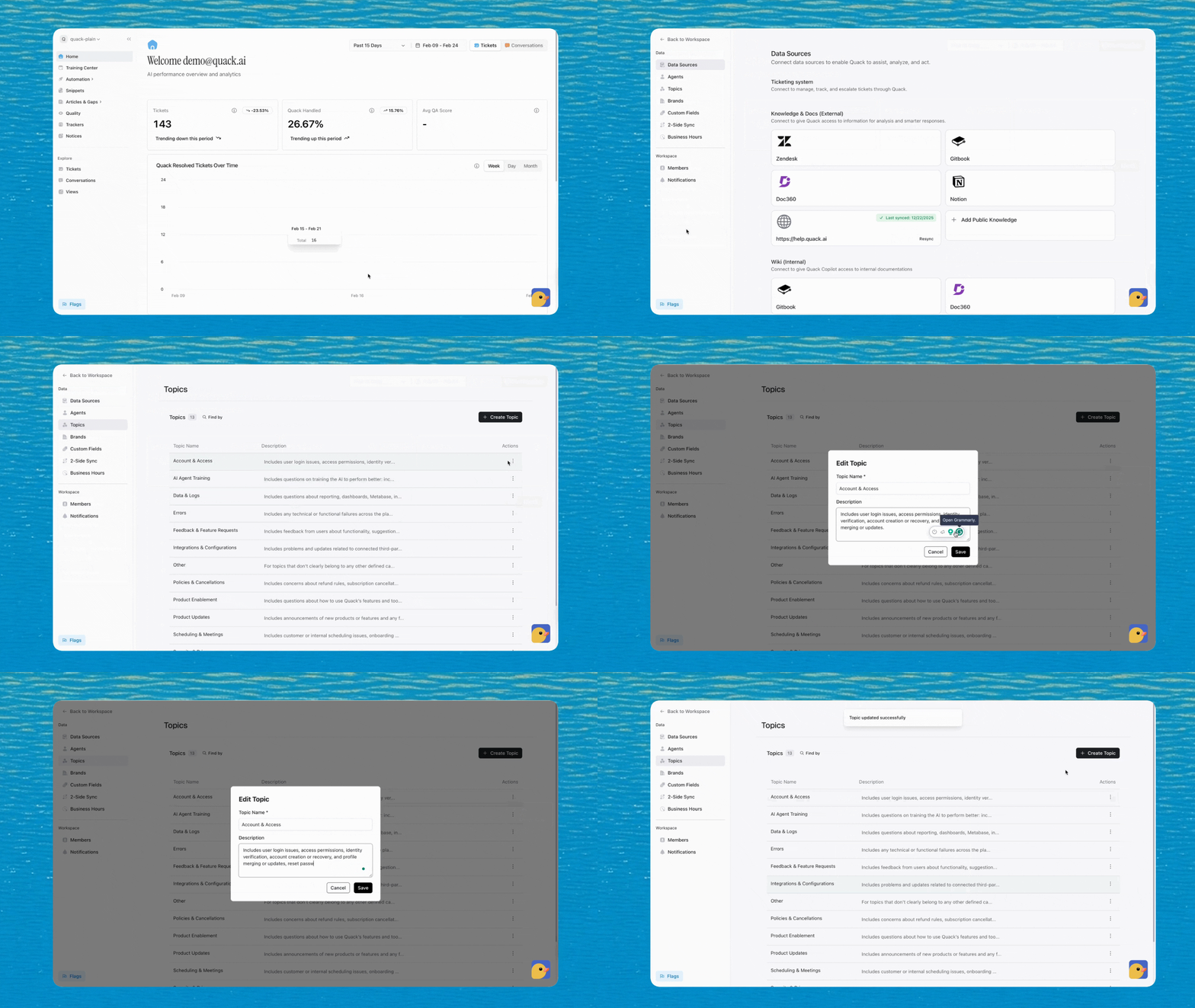
To edit a Topic Description in Quack:
From the top left of the Dashboard, click your Workspace name
Select Settings
Click the Topics tab on the left menu
Find the topic and click the three dots next to the topic name
Select Edit
Enter or update the Topic Description
Click Save
Changes apply only to new conversations and tickets created after you save. Past conversations are not reclassified automatically.
Best Practices
Focus on user intent
Keep descriptions concise and structured
Use consistent phrasing across topics
Make topics mutually exclusive
Next Steps
Go to Settings → Topics to review or refine your Topic Descriptions and improve your routing accuracy.
💡Pro Tip: After updating several Topic Descriptions, monitor newly classified conversations in the Dashboard to identify patterns and fine-tune if needed.
Was this helpful?
Still need help? Share an idea