Enrichments
Overview
Enrichments automatically add structured information to each interaction. They reduce manual tagging, surface operational insights, and help you understand the bigger picture across products, issues, and customer behavior.
Enrichments let you add structured, automated insights to every interaction in Quack AI. They help you replace manual tagging, unlock operational insights, and power Trackers and Explore filters. Use this guide to create an enrichment that’s accurate, consistent, and actionable.
Before You Start
When you create a new enrichment, you begin with a blank input.
To generate the most accurate enrichment, answer these questions directly in the prompt:
What do you want to know?
Should this apply to tickets, chats, or both?
When should the enrichment run: at the start, at the end, or every time the interaction updates?
What are the possible answer options? Examples: Yes/No, P1–P4, Product A/B/C.
Providing these details helps Quack classify interactions consistently.
Generate the Enrichment
Go to Automation and then click on Enrichments. At the top right side of the screen, click on Create Enrichment.
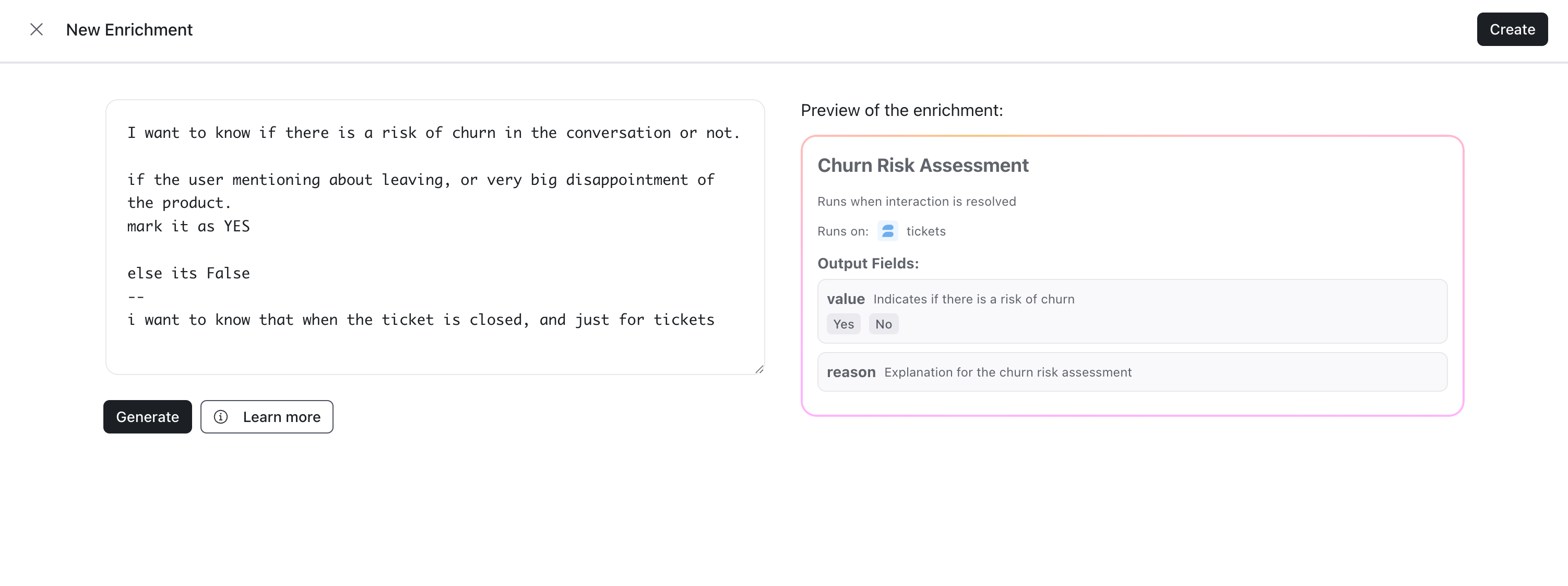
Enter your answers into the enrichment prompt. You can see some existing Enrichments and more instructions on prompting by clicking on Learn More.
Once you have entered the prompt, click on Generate.
A Preview of the Enrichment will appear on the right hand side of the prompt. Review the it and check the data that will be added to each interaction based on your prompt.
Regenerate as needed until the output matches what you expect.
When you’re ready, click on Create at the top right.
Create and Activate the Enrichment
Select Create.
Open the Enrichments list.
Toggle the enrichment On to enable it.
Where You’ll See Your Enrichment
You can use enrichment values throughout Quack:
• In the ticket or conversation view
• To create Trackers
• To filter Explore
• To build custom Explore views
Examples
Reduce manual tagging and labeling:
• Identify the product line associated with the ticket
• Apply priority based on internal policyUnlock operational insights:
• Detect churn risk
• Identify competitor mentionsUnderstand the bigger picture:
• Track knowledge gaps
• Capture customer feedback patterns
Was this helpful?
Still need help? Share an idea