Evaluations
The Evaluations feature helps teams measure, understand, and improve the quality of their customer support. It automatically analyzes every closed ticket, human and AI-handled, and provides insights into agent performance, team efficiency, and overall service quality.
1. Understanding Evaluations
Evaluations offer 100% ticket coverage: every closed ticket is assessed for accuracy, tone, and resolution quality. Results are grouped by team and agent to give you both a high-level and detailed view of support performance.
Key Highlights
Automatic Coverage: Every ticket is evaluated automatically - no manual setup needed.
Team View: See QA results organized by team and drill down to individual agents.
Scorecards: For tickets with multiple agents, view both per-agent and total ticket performance.
Manual Adjustments: If an evaluation score seems off, you can adjust it manually. Quack learns from these corrections to improve future evaluations.
Access Points: Evaluations can also be viewed under Explore, searchable by ticket ID, agent, or topic.
2. Generating Reports
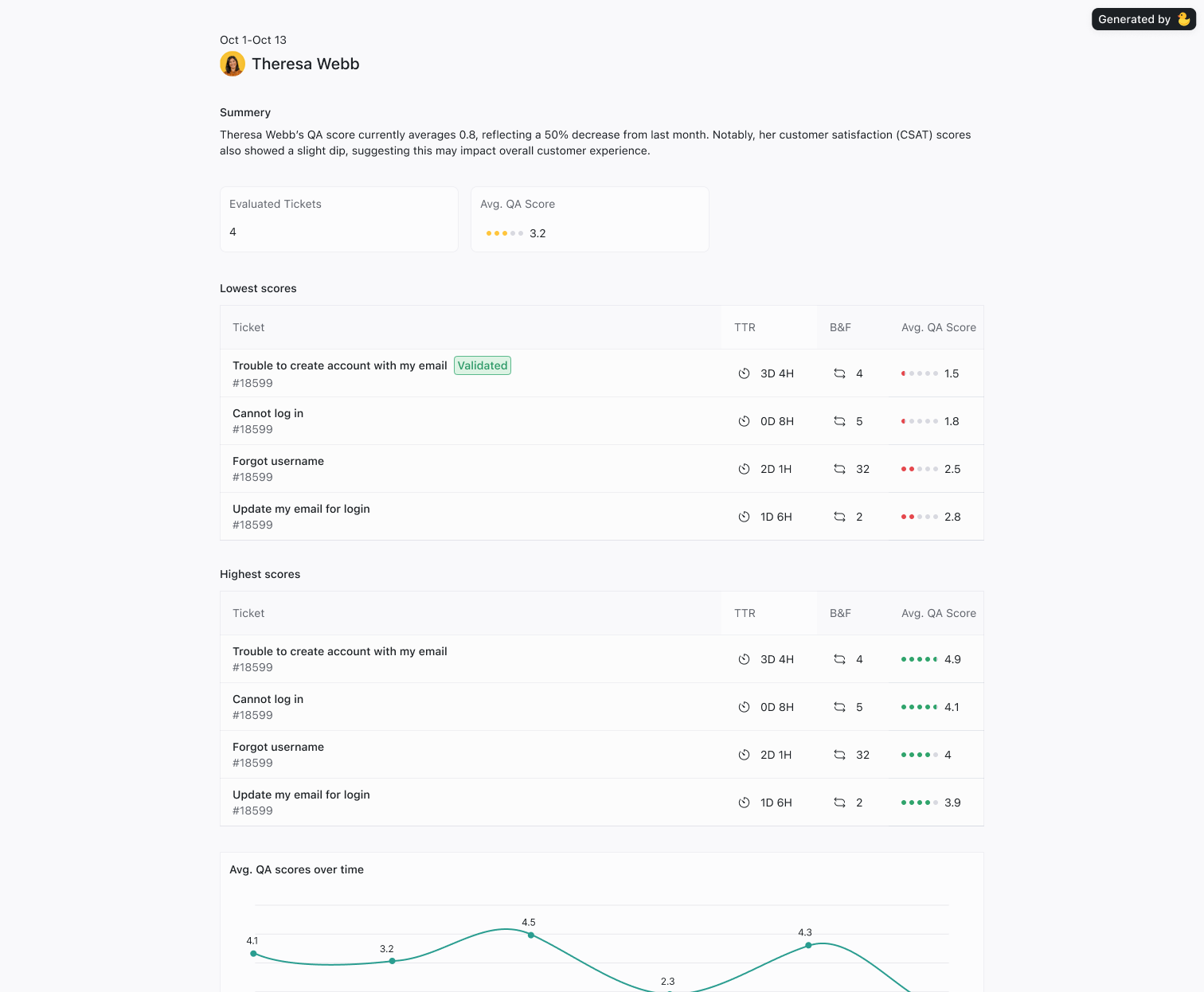
Evaluations automatically generate detailed reports to track performance across teams and agents:
By Team: Compare performance across different support teams.
By Agent: Identify top performers and coaching opportunities.
By Topic: Analyze QA scores by customer inquiry type to uncover training needs.
Agent Reports can be exported for sharing with the team.
3. Filtering Reviewed Tickets
Use filters to focus on the tickets that matter most:
QA Scores: Sort by score to find top and low-performing interactions.
Sentiment: Filter by positive or negative sentiment to uncover experience gaps.
Agent Performance: Identify patterns in resolution speed or escalation rate.
💡 Pro Tip: Combine Sentiment and QA Score filters to quickly spot tickets with high impact on customer satisfaction.
4. Reviewing Ticket Details
Each evaluated ticket includes a comprehensive overview:
Full Transcript: Read the entire conversation for context.
Summary & Key Details: View ticket topic, sentiment, and resolution time at a glance.
QA Evaluation: See how the ticket scored based on your team’s quality metrics and standards.
5. Benefits of Evaluations
Improve Agent Performance: Identify strengths and coaching opportunities.
Ensure Consistency: Standardize QA reviews across teams and agents.
Enhance Customer Experience: Use insights to refine workflows and reduce friction.
Support Compliance: Track adherence to policies and service standards.
Final Notes
The Evaluations feature gives your team a complete picture of support quality. By combining automated analysis, flexible reporting, and adaptive learning, Quack helps you continuously improve your service quality and team performance.
Was this helpful?
Still need help? Share an idea